Context Engineering for Long-Running Agents: Beating Context Rot With the Filesystem
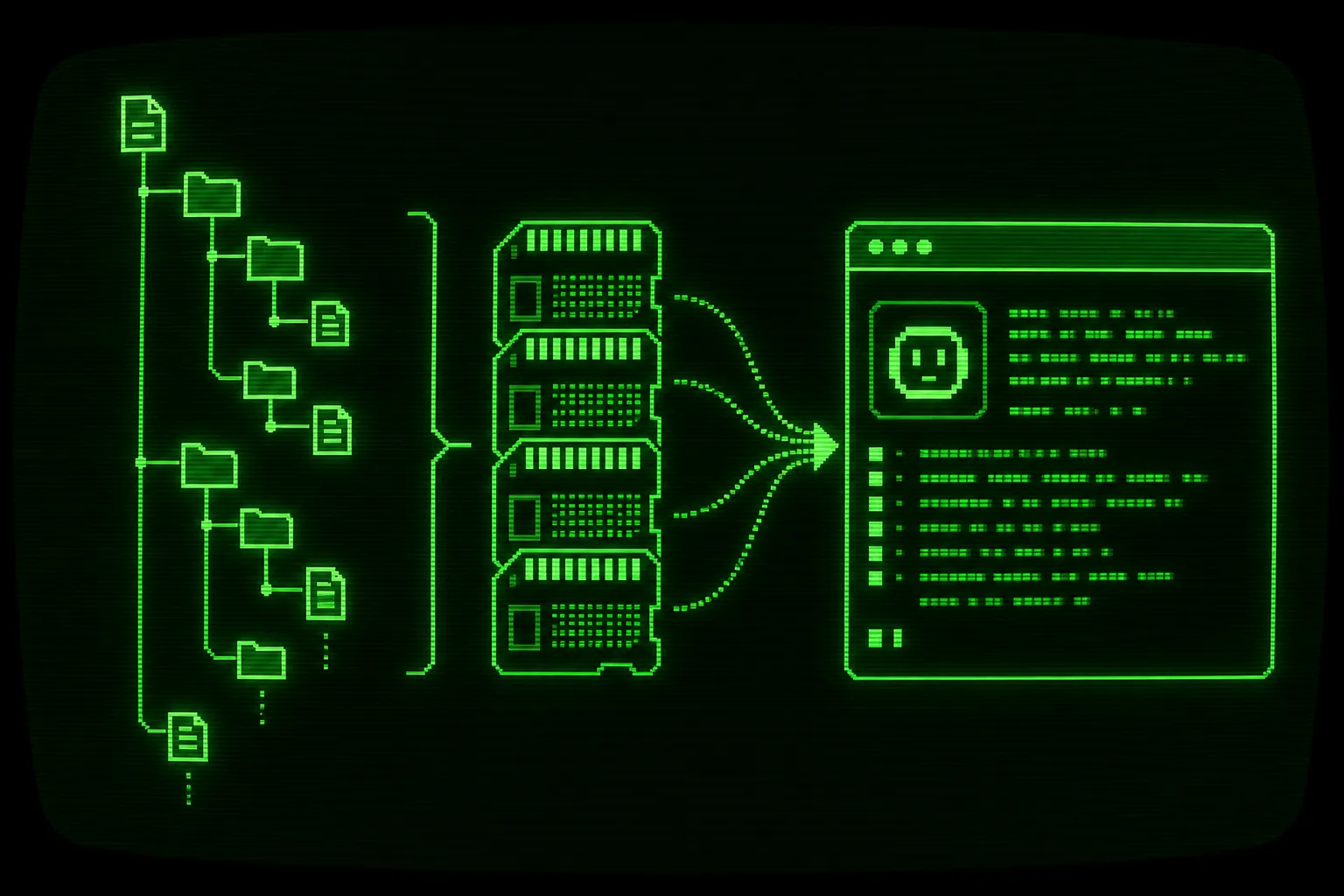

Long sessions rot. The longer an agent stays inside one context window, the worse it gets at the task: it forgets early decisions, repeats finished work, and contradicts itself. The fix is not a bigger model or a longer window. The fix is to start each iteration with a clean context window and keep every piece of durable state on disk, so progress lives in files and git history instead of chat scrollback.
That is the whole idea behind context engineering for a long-running loop. You stop treating the conversation as memory. You treat the filesystem as memory, and you rebuild just enough context at the top of every iteration. This post covers what context rot is, why it happens, and how to wire the filesystem and git history into the memory layer that keeps an agent productive across hundreds of iterations.
What is context rot, and why does it happen?
Section titled “What is context rot, and why does it happen?”Context rot is the slow degradation in an agent’s output quality as a single context window fills with history. It is the practical reason a chat that started sharp turns into a confused mess after a few hours.
A few mechanics drive it:
- The window fills. Every tool call, file dump, test log, and stack trace stays in the transcript. Once the window is mostly old output, there is little room left for the model to reason about the current step.
- Attention spreads thin. With tens of thousands of tokens of history, the model weighs stale instructions and dead ends as heavily as the live task. Early mistakes get anchored and repeated.
- State drifts from reality. The transcript records what the agent believed at minute five. The codebase has moved on since then. The agent reasons against a snapshot that no longer matches disk.
- Summaries lose fidelity. Auto-compaction helps, but each round of summarizing a summary throws away detail. After enough compactions the agent is working from a blurry photocopy of its own plan.
The naive response is to ask for a bigger window. That delays the problem instead of solving it. A 1M token window still rots; it just takes longer to fill and costs more per call while it does. The structural fix is to keep the working context small and stable on purpose.
This is exactly the problem the Ralph technique is built around. If you want the full picture of how the loop architecture holds up over a multi-hour or multi-day run, start with the pillar on running an AI coding agent overnight. For the origin and shape of the technique itself, see what the Ralph technique is. Geoffrey Huntley’s original writeup, “Ralph is a Bash loop”, is the primary source.
Fresh context per iteration is the core move
Section titled “Fresh context per iteration is the core move”The single most important decision is to throw away the context window between units of work. In a Ralph loop, each iteration starts the agent with a clean slate. It reads the current state from disk, does one task, writes the result back to disk, and exits. The next iteration is a brand new agent that never saw the previous transcript.
You run it like this:
# Run up to 50 iterations, fresh context each time./ralph.sh -n 50
# Or run exactly one iteration to inspect the behavior./ralph.sh --once
Each iteration follows the same shape:
- Find the highest-priority incomplete task in
.agent/tasks.json. - Work the steps in
.agent/tasks/TASK-{ID}.json. - Run tests, linting, and type checking.
- Complete the task, take a screenshot, update task status, and commit.
- Repeat until all tasks pass or the iteration cap is reached.
The agent never carries a 4 hour transcript. It carries one task spec plus whatever it reloads from disk. Context stays small because you keep refilling it from a clean source instead of letting it accumulate.
Anthropic shipped an official Claude Code plugin that does a version of this with a Stop Hook that re-injects the prompt when the agent stops. The Claude Code docs describe the hook system. Our implementation is the hackable ralph.sh script, so you can read and change every line of how context gets reset.
The filesystem and git history as the memory layer
Section titled “The filesystem and git history as the memory layer”If context resets every iteration, the memory has to live somewhere durable. That somewhere is the filesystem and the git history. Here is how the durable state moves between iterations.
flowchart TD
  Disk["Disk state: .agent/tasks.json, .agent/logs/LOG.md, prd/SUMMARY.md, git log"]
  subgraph IterN["Iteration N (fresh context)"]
    ReadN["Read disk, reorient from PROMPT.md"]
    WorkN["Work one task, run tests"]
    WriteN["Commit, update tasks.json, append LOG.md"]
  end
  subgraph IterN1["Iteration N+1 (fresh context)"]
    ReadN1["Read disk, reorient from PROMPT.md"]
    WorkN1["Work next task, run tests"]
    WriteN1["Commit, update tasks.json, append LOG.md"]
  end
  Disk --> ReadN --> WorkN --> WriteN --> Disk
  Disk --> ReadN1 --> WorkN1 --> WriteN1 --> Disk
The agent reads from disk, writes to disk, and exits. The disk is the only thing that persists. Each part of the .agent/ directory plays a role.
tasks.json is the source of truth for what is left
Section titled “tasks.json is the source of truth for what is left”.agent/tasks.json is a lookup table of every task and its status. Per-task detail lives in .agent/tasks/TASK-{ID}.json. A fresh agent reads the table, picks the highest-priority incomplete task, and opens its spec. Nothing about which task is next depends on remembering a conversation.
{ "tasks": [ { "id": "001", "title": "Add auth middleware", "priority": 1, "status": "done" }, { "id": "002", "title": "Wire login form to API", "priority": 2, "status": "in_progress" }, { "id": "003", "title": "Add e2e test for logout", "priority": 3, "status": "todo" } ]}Splitting the flat table from the per-task specs is what lets the loop scale to hundreds of tasks without bloating any single read. The table stays small. The spec for the current task is the only heavy file the agent loads.
LOG.md and history are the narrative record
Section titled “LOG.md and history are the narrative record”.agent/logs/LOG.md is the running log of what happened. .agent/history/ holds per-iteration logs. When a new agent needs to know why a previous decision was made, it reads the log instead of reconstructing it from a transcript that no longer exists. This is the observability layer of the loop, and it is what makes a long run auditable. For the full treatment of logs, history, and live output, see observability for autonomous coding agents.
SUMMARY.md and the PRD anchor the goal
Section titled “SUMMARY.md and the PRD anchor the goal”.agent/prd/PRD.md holds the product requirements. .agent/prd/SUMMARY.md holds the compressed version a fresh agent reads first to reorient on the big picture. The PRD is the why. The task specs are the how. The summary is the bridge that fits in a small context budget.
git log is free, structured memory
Section titled “git log is free, structured memory”Every completed task ends in a commit. That means git log is a second, independent record of progress that you get for nothing.
# What has the loop actually done, most recent firstgit log --oneline -20
# What changed in the last completed taskgit show --stat HEAD
A fresh agent (or you, in the morning) can reconstruct the entire arc of the work from commits alone. Because the loop uses Conventional Commit messages, the log reads like a changelog of the agent’s decisions. The transcript is disposable. The commit history is permanent.
How do you design PROMPT.md so a clean-context agent reorients each iteration?
Section titled “How do you design PROMPT.md so a clean-context agent reorients each iteration?”.agent/PROMPT.md is the prompt sent to the agent at the start of every iteration. It is the steering wheel of the loop. Because the agent has zero memory of the last run, this file has to do all the reorientation work in a few hundred tokens.
A good PROMPT.md does five things, in order:
- State the role and the mode. Implementation is the default. You can swap it for refactor, review, or test modes when the job changes.
- Point at the source of truth. Tell the agent to read
tasks.json, pick the highest-priority incomplete task, and open its spec. Do not describe the tasks inline; point at the files. - Enforce the one-task rule. Make it explicit that the agent completes exactly one task, commits, and stops. It never batches.
- Define the verification gate. Tests, linting, type checking, and a screenshot must pass before a task counts as done. The repo mantra is direct: if you didn’t test it, it doesn’t work.
- Specify the completion signal. The agent emits a promise tag so the loop knows what to do next.
The promise tags are the explicit handoff between agent and loop:
<promise>COMPLETE</promise> all tasks finished<promise>BLOCKED:reason</promise> needs human help<promise>DECIDE:question</promise> needs a decisionThose map to exit codes the wrapper script reads: 0 for COMPLETE, 1 for MAX_ITERATIONS, 2 for BLOCKED, 3 for DECIDE. The loop stops on an explicit signal, not on a vibe. That is the difference between a loop that ends cleanly and one that spins on a task it cannot finish.
The key design constraint: PROMPT.md must assume the reader knows nothing. Write it for an agent that just booted with an empty window. Every iteration is that agent. If the prompt depends on context the agent does not have, the loop drifts. If the prompt sends the agent straight to disk to rebuild its bearings, the loop stays on track no matter how many iterations deep it is.
You can also steer a run without stopping it. Edit .agent/STEERING.md mid-loop to inject critical work that the agent handles before it resumes the task list. That keeps the prompt itself stable while still letting you redirect a long run mid-flight, which is one of the architecture choices covered in the overnight run pillar.
Keep tasks atomic so context stays small
Section titled “Keep tasks atomic so context stays small”Fresh context per iteration only helps if a task fits in a fresh context. A task that touches twenty files and needs three subsystems in scope will blow the budget no matter how clean the window starts. The discipline that protects the loop is one task per invocation, and tasks small enough that one task plus its dependencies fit comfortably.
What atomic means in practice:
- One responsibility. A task changes one thing: a single component, a single endpoint, a single test file. If you cannot describe it in one sentence, it is too big.
- Independently verifiable. The task has acceptance criteria that a test, a type check, or a screenshot can confirm. The agent knows it is done without asking you.
- Self-contained context. The files the task needs are listed in its spec. The agent does not have to discover half the codebase to start.
When tasks are atomic, the context window stays small by construction. The agent loads one spec, the few files it names, and the verification commands. There is no room for rot because there is barely any history to rot. When tasks are bloated, the agent fills the window mid-task, starts rotting, and produces the exact confused output you were trying to avoid.
This is why the breakdown step matters as much as the loop. A PRD that decomposes into clean, atomic task packets gives the loop something it can actually grind through. Verification is the other half: each task ends with tests and a screenshot so a fresh agent can trust the recorded status: done instead of re-checking work. See verification loops for AI agents for how tests, type checks, and screenshots give the loop the feedback it needs to keep its memory honest.
Putting it together: context engineering as a system
Section titled “Putting it together: context engineering as a system”Context engineering for a long-running agent is not one trick. It is a system with four parts that reinforce each other:
- Reset the window every iteration so rot never accumulates.
- Store all durable state in
.agent/files and git so memory survives the reset. - Write
PROMPT.mdto reorient a blank-slate agent from those files in a few hundred tokens. - Keep tasks atomic so a fresh window is always enough to finish the current unit of work.
Remove any one part and the others weaken. Skip the reset and you get rot. Skip the disk state and the reset erases progress. Skip the reorientation prompt and the fresh agent flails. Skip atomic tasks and the window fills before the task is done. Together they let an agent run far longer than any single context window would allow, because no single context window has to hold the whole job.
Get this right and the run length stops being bounded by the model’s window. It becomes bounded by how many atomic tasks you have queued and how much you are willing to spend. The filesystem carries the memory. Each iteration just borrows a small, fresh slice of it.
Frequently asked questions
What is context rot in AI agents?
Context rot is the gradual decline in an agent output quality as a single context window fills with history. The window runs out of room, attention spreads across stale and live instructions, and the agent reasons against a snapshot that no longer matches the codebase. It is why a long chat session gets worse over time even with a capable model.
Does a larger context window fix context rot?
No. A larger window delays the problem but does not remove it. The window still fills, attention still spreads, and cost per call rises while it happens. The structural fix is to keep the working context small by resetting it each iteration and storing durable state on disk.
How does a Ralph loop keep context fresh?
A Ralph loop starts each iteration with a clean context window. The agent reads the current state from .agent/tasks.json and its task spec, works exactly one task, runs tests, commits, and exits. The next iteration is a new agent that never saw the previous transcript, so history cannot accumulate.
Where does the agent memory live if the context resets?
On disk and in git. Task status lives in .agent/tasks.json, detail lives in per-task spec files, the narrative lives in .agent/logs/LOG.md and the history directory, the goal lives in the PRD and SUMMARY.md, and every completed task ends in a commit. A fresh agent reconstructs its bearings from those files instead of from chat scrollback.
Why do tasks need to be atomic for long-running agents?
Because a fresh context only helps if the task fits inside it. An atomic task has one responsibility, clear acceptance criteria, and a short list of files it needs, so one task plus its dependencies fit in a small window. Bloated tasks fill the window mid-run and bring back the exact rot you reset the context to avoid.